

Independent CPAs, lawyers, and doctors in Miami lose an average of 40 hours monthly to email and repetitive admin tasks. That’s a full work week vanishing into inbox management, document shuffling, and manual data entry. Workflow automation transforms this reality by reclaiming those hours and converting them into billable time, strategic client work, and measurable revenue growth. This guide walks you through the evidence-based steps to automate your practice, from identifying your biggest bottlenecks to scaling proven systems across your entire operation.
Table of Contents
- Why automate your workflow?
- What you need to get started
- Step-by-step: How to automate your workflow
- Troubleshooting and best practices
- Measuring success and scaling automation
- Take your workflow automation further with expert support
- Frequently asked questions
Key Takeaways
| Point | Details |
|---|---|
| Huge time savings | Automating workflows can free up at least 40 hours per month for Miami professionals. |
| Quick ROI | Firms usually recoup automation investments in weeks or months by streamlining admin work. |
| Start small | Testing automation on one process first lowers risk and speeds your learning curve. |
| Ethics require oversight | Automation needs consistent human review to ensure compliance and client trust. |
| Scalable growth | Workflow automation allows you to expand capacity and boost revenue with your existing team. |
Why automate your workflow?
Miami professionals face unique pressures. You’re competing for high-value clients while managing compliance requirements, client expectations, and operational overhead. Manual workflows create three critical problems: they cap your capacity, introduce costly errors, and prevent you from taking on larger engagements.
CPA firms using AI-powered systems eliminate 40 hours of monthly email through intelligent routing and automated responses. That’s 480 hours per year returned to revenue-generating activities. For a partner billing at $300 per hour, that’s $144,000 in recovered capacity annually.
The legal sector shows similar gains. Over 60% of personal injury law firms now adopt AI for administrative tasks, from case intake to document review. Medical practices benefit equally, with automated appointment scheduling, insurance verification, and patient follow-up reducing front-office workload by 30-50%.
The strategic advantage goes beyond time savings:
- Scale your firm without proportional hiring costs
- Accept larger, more complex client engagements
- Reduce error rates in compliance-critical processes
- Free partners and senior staff for business development
- Improve client response times and satisfaction scores
“Automation doesn’t replace expertise. It amplifies it by handling the repetitive work that prevents you from applying your judgment where it matters most.”
Miami’s competitive professional services market rewards firms that can deliver faster turnarounds and handle greater volume without sacrificing quality. Workflow strategies for professionals show that automation creates this capacity advantage while maintaining the personal touch clients expect.
What you need to get started
Successful automation requires three foundational elements: the right technology infrastructure, clearly documented processes, and team buy-in. Most Miami firms already have 70% of what they need.
Your technology checklist includes secure cloud storage, reliable internet connectivity, and devices that support modern web applications. You don’t need enterprise-grade systems to start. Many successful implementations begin with tools like Microsoft 365, Google Workspace, or practice management platforms you already use.
Process documentation comes next:
- Map your current workflow from client contact to project completion
- Identify repetitive tasks that follow consistent rules
- Note where delays, errors, or bottlenecks occur most frequently
- Document compliance requirements and approval steps
| Requirement | CPAs | Lawyers | Doctors | Timeline |
|---|---|---|---|---|
| Cloud infrastructure | Microsoft 365, QuickBooks Online | Clio, NetDocuments | Practice management system | 1-2 weeks |
| Process mapping | Tax workflow, client intake | Case management, discovery | Patient scheduling, billing | 2-4 weeks |
| Pilot project | Document processing | Contract review | Appointment reminders | 4-6 weeks |
| Staff training | 2-3 sessions | 2-3 sessions | 2-3 sessions | 2 weeks |
| Full deployment | Expand to additional workflows | Scale to more practice areas | Integrate with EHR | 8-12 weeks |
Benchmark data shows CPAs achieve 70% time savings and double their capacity, while lawyers see 51% productivity gains. These results come from starting small and expanding systematically.

Pro Tip: Choose one high-volume, low-complexity workflow for your pilot project. Client intake, appointment scheduling, or document routing are ideal candidates because they’re repetitive, rule-based, and easy to measure.
Security and compliance can’t be afterthoughts. Your automation tools must meet industry standards for data protection. For CPAs, that means IRS Publication 4557 compliance. Lawyers need to maintain attorney-client privilege and follow state bar technology guidelines. Medical practices must ensure HIPAA compliance at every automation touchpoint.
Change management matters as much as technology. Staff who understand how automation helps them, not replaces them, become your strongest advocates. Frame automation as eliminating frustrating busy work so they can focus on meaningful client interactions and professional development.
Before selecting specific tools, review our automation prerequisites guide and process automation software comparison to match your firm’s specific needs and budget.
Step-by-step: How to automate your workflow
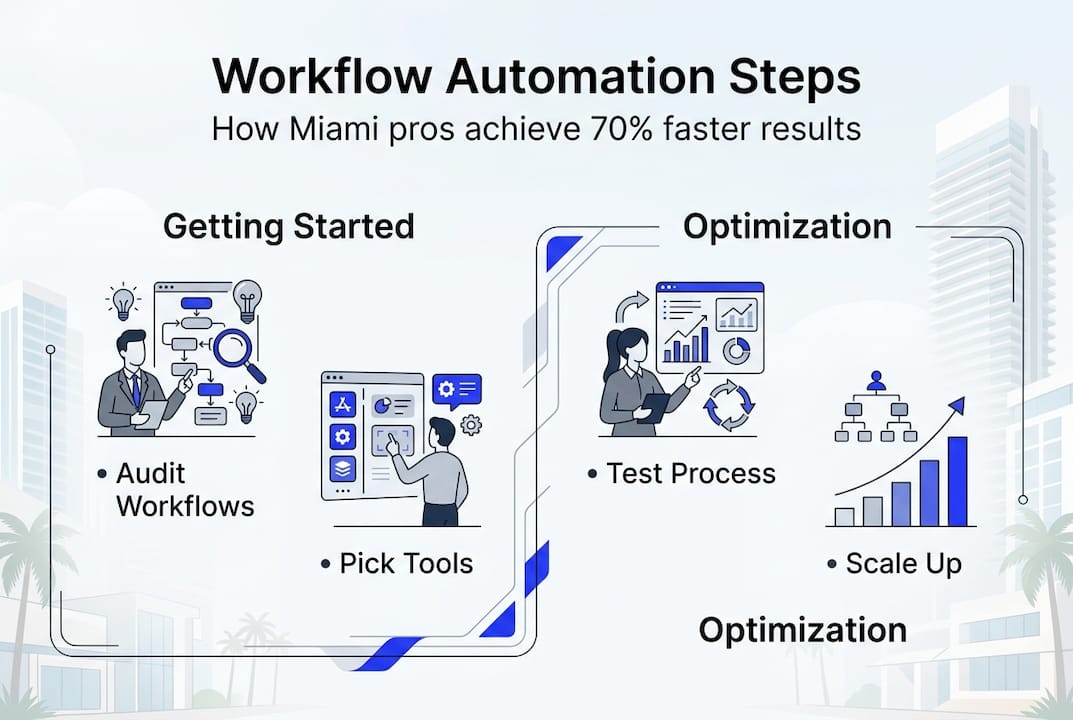
Follow this proven framework to move from manual processes to automated systems that scale with your practice.
1. Audit your current workflows and identify pain points
Spend two weeks tracking where your team’s time actually goes. Use time-tracking software or simple spreadsheets to log hours by activity type. You’ll likely discover that 40-60% of time goes to tasks that could be automated: data entry, scheduling, document routing, status updates, and routine correspondence.
Interview your team about their biggest frustrations. The tasks they complain about most are often the best automation candidates.
2. Select your pilot project and automation tools
Choose one workflow that’s high-volume, clearly defined, and measurable. Client intake works well because it’s repetitive and has obvious success metrics: time from first contact to engagement letter signed.
Match tools to your specific workflow. For document processing, consider platforms like DocuSign or PandaDoc. For client communication, explore automated email sequences through your CRM. For scheduling, tools like Calendly or Acuity integrate with your calendar and eliminate phone tag.
3. Map and digitize your chosen process
Document every step in your current workflow. Create a flowchart showing decision points, handoffs, and approval requirements. Identify which steps require human judgment and which follow consistent rules.
Digitize paper-based elements. Convert intake forms to online questionnaires. Move document storage to cloud platforms with version control. Replace email attachments with shared links to centralized files.
4. Configure automation and run controlled tests
Set up your automation using the mapped workflow as your blueprint. Most modern platforms use visual workflow builders that don’t require coding. You’ll define triggers (what starts the automation), actions (what happens automatically), and conditions (when different paths apply).
Test thoroughly with internal scenarios before involving clients. Run 10-20 test cases covering normal situations and edge cases. The Miami-Dade Public Defender’s Office uses CoCounsel AI as a force multiplier, but they maintain rigorous testing protocols to ensure accuracy.
5. Launch, monitor, and optimize continuously
Start your pilot with a small subset of clients or cases. Monitor results daily for the first two weeks. Track your key metrics: time saved, error rates, client satisfaction, and team feedback.
Expect to make adjustments. Start with small pilots and maintain human review for judgment calls and ethical considerations. No automation is perfect on day one. The goal is continuous improvement, not instant perfection.
| Profession | Best First Automation | Recommended Tools | Expected Time Savings |
|---|---|---|---|
| CPAs | Tax document processing, client intake | Liscio, Karbon, SmartVault | 40+ hours monthly |
| Lawyers | Case intake, contract review | Clio, CoCounsel, ContractPodAi | 30-35 hours monthly |
| Doctors | Appointment scheduling, insurance verification | Phreesia, Zocdoc, Clearwave | 25-30 hours monthly |
Pro Tip: Document your automation setup and create simple user guides for your team. When you’re ready to scale, you’ll have a playbook that makes expansion faster and more consistent.
Explore detailed workflow automation scenarios and our complete process automation step-by-step guide for profession-specific implementation strategies.
Troubleshooting and best practices
Even well-planned automation projects hit obstacles. Anticipating common challenges helps you navigate them quickly.
Top mistakes to avoid:
- Trying to automate everything at once instead of proving value with one workflow first
- Ignoring user feedback during the pilot phase
- Skipping compliance reviews for automated processes
- Assuming automation eliminates the need for human oversight
- Choosing complex tools when simpler solutions would work better
- Failing to document your automation logic for future troubleshooting
When automation doesn’t work as expected, start with these troubleshooting steps. First, verify that your triggers are firing correctly. Check your automation logs to see where the process stops or deviates. Most platforms provide detailed activity logs that show exactly what happened.
Second, review your conditional logic. Small errors in if/then rules cause unexpected behavior. Test each condition independently to isolate the problem.
Third, confirm that integrations between systems are working. API connections can break when one platform updates. Check authentication credentials and permissions.
Expert best practices for long-term success:
- Schedule monthly reviews of automation performance metrics
- Maintain a feedback channel where staff can report issues or suggest improvements
- Keep a human review layer for client-facing communications and judgment calls
- Document all changes to your automation workflows
- Train new team members on automated systems as part of onboarding
- Stay current with platform updates that might affect your automations
“AI augments rather than replaces professional judgment. Human review remains essential for ethical considerations, complex situations, and maintaining client relationships.”
Compliance deserves special attention. Automated systems must maintain the same standards as manual processes. For CPAs, that means audit trails for all automated decisions. Lawyers need to ensure automated document review doesn’t compromise privilege. Medical practices must verify that automated communications meet HIPAA requirements.
When scaling beyond your pilot, resist the temptation to automate differently across departments. Standardize your approach using the lessons learned from your initial implementation. This consistency makes training easier and troubleshooting faster.
Our workflow software solutions guide helps you select platforms that match your firm’s growth trajectory and technical capabilities.
Measuring success and scaling automation
Quantifying automation impact proves ROI and guides your expansion strategy. Define clear metrics before you launch so you have baseline data for comparison.
Key performance indicators by objective:
- Time savings: Hours spent on the automated task before and after implementation
- Error reduction: Mistake rates in data entry, document processing, or scheduling
- Revenue impact: Billable hours recovered, new client capacity created
- Client satisfaction: Response time improvements, Net Promoter Score changes
- Cost efficiency: Reduction in overtime, temporary staff, or outsourced services
Track these metrics weekly during your pilot and monthly once automation stabilizes. Most firms see measurable improvements within 30-45 days.
Post-launch validation checklist:
- Compare actual time savings to projected savings
- Survey team members about workflow improvements and remaining pain points
- Review error logs and client feedback for quality issues
- Calculate ROI using saved hours multiplied by average billing rate
- Identify the next workflow to automate based on pilot learnings
- Document lessons learned and update your automation playbook
| Metric | CPAs (Before) | CPAs (After) | Lawyers (Before) | Lawyers (After) | Doctors (Before) | Doctors (After) |
|---|---|---|---|---|---|---|
| Admin hours/week | 25 | 10 | 22 | 12 | 20 | 12 |
| Client response time | 24 hours | 4 hours | 48 hours | 8 hours | 72 hours | 12 hours |
| Error rate | 8% | 2% | 6% | 1.5% | 10% | 3% |
| Monthly capacity | 40 clients | 75 clients | 15 cases | 25 cases | 120 patients | 180 patients |
Florida CPAs report a 35% efficiency boost after implementing business process workflow improvements. These gains compound as you automate additional workflows.
When scaling automation, prioritize workflows with similar characteristics to your successful pilot. If document processing worked well, expand to other document-heavy processes before tackling completely different workflow types.
Create a 12-month automation roadmap. Quarter one: pilot and refine. Quarter two: scale to 2-3 additional workflows. Quarter three: integrate automated workflows with each other. Quarter four: optimize and prepare for advanced automation like AI-powered analysis.
Learn more about strategic expansion in our guide to scaling workflow automation.
Take your workflow automation further with expert support
You’ve seen the data. Automation delivers measurable time savings, error reduction, and capacity growth. But moving from concept to implementation requires technical expertise, process knowledge, and ongoing support.
Many Miami professionals partner with IT specialists who understand both the technology and the unique compliance requirements of CPAs, lawyers, and doctors. Expert guidance accelerates your results by helping you avoid common pitfalls, select the right tools for your specific workflows, and integrate automation with your existing systems.

We’ve helped Miami professionals grow their monthly revenue by 7-8 figures through strategic technology implementation. Our approach combines workflow analysis, automation setup, staff training, and continuous optimization. You focus on serving clients while we handle the technical complexity.
Explore our business transformation services to see how we’ve helped firms like yours scale without proportional hiring. Review our technology modernization steps for a detailed look at the implementation process. Or connect directly with our team through our professional IT services page to discuss your specific automation goals.
Frequently asked questions
What is the first workflow professionals should automate?
Start with time-consuming, repetitive admin tasks like client intake or document management. These processes are rule-based, high-volume, and deliver immediate measurable results.
How quickly can firms in Miami see ROI from workflow automation?
Many firms see reduced admin workload within weeks, with review cycles shortened from 8 weeks to 2-5 days. Full ROI typically arrives within 3-6 months depending on the process automated.
Does automation require expensive software or IT teams?
No, most Miami firms use cloud-based platforms with budgets under $5K per year and start with small pilots. Many successful implementations use tools you already have.
Can workflow automation replace human judgment or compliance review?
No, automation augments rather than replaces professional expertise. Human oversight remains essential for ethics, complex decisions, and maintaining client relationships.
Recommended
- Workflow Automation Guide For Miami Professionals: Scale Fast
- 7 Practical Examples Of Workflow Automation For Miami CPAs
- How To Automate Business Processes For CPAs In Miami
- Business Process Automation Steps For Miami Accounting Firms – Stratgetic IT Consultants For Accountants
- Effizienter B2B Terminvereinbarung Workflow für Unternehmen



