

TL;DR:
- Automated workflows can significantly reduce administrative hours and increase revenue growth.
- Success depends on proper system setup, process mapping, and compliance adherence.
- Measuring key performance indicators ensures the effective return on automation investment.
If you’re a Miami doctor, lawyer, or accountant running an independent practice, you already know the feeling: you spend more time on paperwork than on clients. Scheduling conflicts, billing delays, document backlogs, and manual data entry eat hours you could be billing. The good news is that automated workflow systems can cut that administrative load significantly, freeing you to grow your client base and your revenue. This article walks you through exactly what you need to get started, how to set up automation for your specific profession, what pitfalls to avoid, and how to measure real results.
Table of Contents
- What you need to get started with automated workflow systems
- How to set up automated workflows for doctors, lawyers, and accountants
- Troubleshooting common pitfalls and compliance issues
- Measuring results: How automation transforms your efficiency and revenue
- Our perspective: Why Miami professionals must lead with automation, not tools
- Next steps: Let automation drive your Miami practice forward
- Frequently asked questions
Key Takeaways
| Point | Details |
|---|---|
| Start with high-ROI workflows | Automate intake and billing for immediate time savings and revenue impact. |
| Prioritize integration and compliance | Choose cloud systems that work with your current tools and meet regulations like HIPAA. |
| Balance AI with human review | Automated tasks still require oversight to ensure accuracy and compliance. |
| Track and optimize ROI | Measure your efficiency and revenue gains regularly to keep improving your workflows. |
What you need to get started with automated workflow systems
Before you automate anything, you need the right foundation. Practice management software is the core layer, and choosing the wrong one early creates expensive rework later. According to practice management software overviews, workflow systems typically involve practice management software, EHR integrations, AI tools, and require HIPAA or trust compliance depending on your profession.
Here’s what every Miami independent professional needs before launching automation:
- Cloud-based access: Your platform must be accessible from any device, especially if you see clients across multiple locations.
- API integrations: Your tools need to talk to each other. Scheduling, billing, and document systems must connect without manual data transfer.
- Security and compliance: Doctors need HIPAA-compliant platforms. Lawyers need trust accounting features. Accountants need secure data handling that meets IRS standards.
- Workflow builders: Look for platforms that let you create triggers, automated notifications, and task sequences without writing code.
Profession-specific tools to evaluate:
| Profession | Recommended tools | Key feature |
|---|---|---|
| Doctors | DrChrono EHR | Scheduling, billing, EHR integration |
| Lawyers | CosmoLex | Trust accounting, case management |
| Accountants | Karbon, Xero | Tax workflows, bank feeds |
Once you’ve identified your tools, map out your three most time-consuming manual processes. Those are your automation targets. Review your automation workflow strategies before committing to a platform, because the best software is the one that fits your actual workflow, not the one with the most features.
Pro Tip: Start by automating one high-value process, such as appointment reminders or invoice generation, before scaling to more complex workflows. Small wins build team confidence and reveal integration gaps early.
How to set up automated workflows for doctors, lawyers, and accountants
With your checklist in hand, here’s how to actually integrate automated workflow systems into your practice. The setup process is not a one-size-fits-all event. Each profession has distinct bottlenecks, and your automation should target those specifically.
Doctors use cloud EHR for scheduling and billing, lawyers for case and document management, and accountants for tax and bank reconciliation tasks. Knowing your profession’s core use case shapes every setup decision.
Step-by-step setup process:
- Choose your platform. Match software to your profession’s compliance requirements and daily workflow volume.
- Audit your manual processes. List every task your team does by hand each week and estimate the time cost.
- Map current vs. desired workflows. Draw a simple before-and-after diagram showing where automation fits.
- Customize triggers and notifications. Set rules: when a client books, send a confirmation; when an invoice ages 30 days, send a reminder.
- Integrate with existing systems. Connect your EHR, billing software, or tax platform using built-in APIs or tools like Zapier.
- Test before going live. Run a two-week pilot with one team member before full rollout.
Software comparison by profession:
| Profession | Platform options | Best for |
|---|---|---|
| Doctors | DrChrono, CareCloud | Patient scheduling, billing automation |
| Lawyers | CosmoLex, Clio | Document templates, case tracking |
| Accountants | Karbon, Xero | AP workflows, client task management |
Quick wins you can set up in week one include automated client intake forms, appointment reminders via SMS, case document templates, and accounts payable approval workflows. These changes alone can reclaim several hours per week. See real automation for revenue growth examples from firms that made this shift.
Pro Tip: Involve your front desk staff or paralegal in the setup process. They know where the real bottlenecks are, and their buy-in determines whether the system gets used or ignored.
For inspiration on what’s possible, review workflow automation examples from practices similar to yours. Real-world cases make abstract automation concepts concrete and actionable.
For a deeper look at what accounting firm automation looks like in practice, the results speak clearly: faster cycles, fewer errors, and more time for client-facing work.
Troubleshooting common pitfalls and compliance issues
Implementing automation can hit snags. Here’s how to anticipate and resolve the most frequent issues before they cost you time, money, or a compliance violation.
The most common mistakes Miami professionals make when rolling out automation:
- Over-relying on AI outputs: AI tools can draft documents and flag billing errors, but they are not infallible. Up to 80% of AI-generated content in legal and medical contexts may need human review before it’s client-ready.
- Underestimating setup time: Most platforms require 4 to 8 weeks to fully configure, test, and train staff. Rushing this phase leads to broken triggers and frustrated teams.
- Staff resistance: People protect familiar routines. Without clear communication about why automation helps them personally, adoption stalls.
- Compliance gaps: Automation accuracy and compliance concerns are real. HIPAA violations, trust accounting errors, and unsecured data transfers are not theoretical risks. They happen when professionals skip the compliance audit during setup.
Regulatory must-haves by profession:
- Doctors: HIPAA-compliant data storage, encrypted patient communications, audit trails for EHR access.
- Lawyers: Trust accounting segregation, client confidentiality controls, conflict-of-interest checks.
- Accountants: Secure file transfer for tax documents, role-based access controls, data retention policies.
“Hybrid human-AI review is essential for professional accuracy,” per experts in legal and medical workflow automation. No system, however advanced, replaces professional judgment.
To stay on track, use a phased rollout. Start with low-risk administrative tasks, then expand to client-facing and compliance-sensitive workflows once your team is confident. Review your workflow automation scaling plan quarterly to catch gaps before they become problems. For a detailed look at how legal case management automation handles these risks, the leading platforms now build compliance checks directly into workflow templates.
Measuring results: How automation transforms your efficiency and revenue
Once your workflows are running, it’s critical to assess their impact on your practice. Automation without measurement is just expensive software.

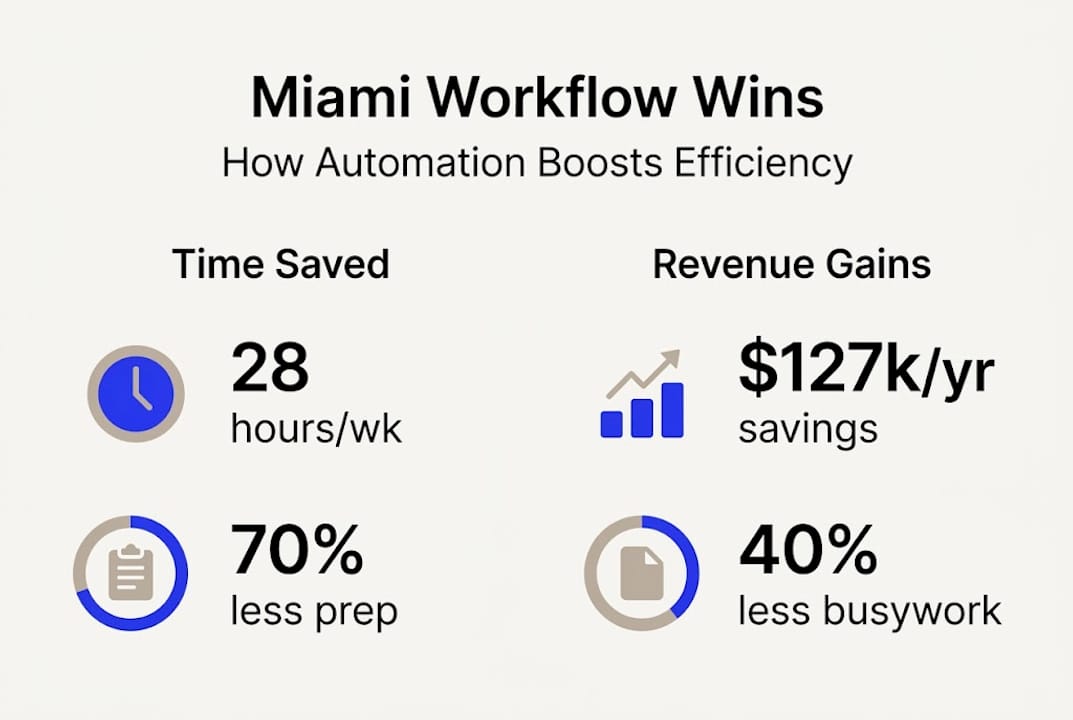
Empirical automation benchmarks show firms see 28 hours per week saved, 70 to 80% document prep reduction, 40% busywork reduction, 73% lower accounts receivable, and 20 to 30% more billable time. Those are not projections. Those are results from firms that committed to the process.
Before-and-after performance comparison:
| Metric | Before automation | After automation |
|---|---|---|
| Admin hours per week | 18 to 22 hours | 6 to 9 hours |
| Invoice turnaround | 7 to 10 days | 1 to 2 days |
| Client intake time | 45 to 60 minutes | 10 to 15 minutes |
| Billing error rate | 12 to 18% | 2 to 4% |
How to measure your automation ROI:
- Baseline your KPIs before launch: log hours spent on admin, billing cycles, and intake time.
- Track weekly for 90 days after go-live. Look for trends, not just snapshots.
- Calculate labor savings. Multiply hours saved by your average hourly rate or staff cost.
- Measure client experience. Track response times, appointment no-shows, and billing disputes.
- Audit quarterly. Survey staff for friction points and review which automations are underperforming.
The 40% busywork reduction and $127,000 per year in labor savings that leading firms report come from consistent measurement and iteration, not from simply installing software. Explore the workflow efficiency boost strategies that Florida professionals are using to hit these numbers. If you’re still weighing the decision, the case for why automate workflows becomes undeniable once you see the numbers side by side. For a compelling law firm results case study, the efficiency gains in document automation alone justify the investment.
Our perspective: Why Miami professionals must lead with automation, not tools
Here’s something most technology vendors won’t tell you: the software is the easy part. The hard part is knowing which problem you’re actually solving before you buy anything.
We’ve worked with Miami doctors, lawyers, and accountants who invested in premium automation platforms and saw minimal returns. Not because the tools were bad, but because they skipped the process audit. They automated chaos and got faster chaos.
Integration and process-first thinking consistently outperform feature-chasing. The professionals seeing the biggest returns started by mapping their workflows on paper, identifying their three biggest time drains, and only then selecting tools that addressed those specific gaps.
Our advice: don’t let a features checklist drive your decision. Let your bottlenecks drive it. And revisit your smart automation strategy every year, because your practice evolves and your tools should evolve with it.
Pro Tip: Set a calendar reminder every 12 months to review your automation stack. Tools that served you at 10 clients may not serve you at 50.
The best ROI doesn’t come from the most sophisticated platform. It comes from matching the right automation to the right bottleneck at the right time.
Next steps: Let automation drive your Miami practice forward
You now have a clear picture of what automated workflow systems can do for your practice. The difference between knowing and doing, though, is where most independent professionals stall.

Our technology consulting for automation team works specifically with Miami doctors, lawyers, and accountants who are ready to move from manual processes to scalable, revenue-generating systems. Whether you’re just starting or looking to optimize what you’ve already built, we can help you prioritize the right moves. Explore our business transformation for CPAs program or review our full tech strategy for growth framework. The next step is a conversation, not a commitment.
Frequently asked questions
How long does it take to implement an automated workflow system?
Implementation typically takes 4 to 8 weeks, depending on system complexity and how prepared your team is for the transition.
What is the most profitable workflow to automate first?
Client intake and billing deliver the fastest returns. Start with intake and billing to capture high ROI quickly and build team confidence in the process.
Are automated workflow systems secure enough for legal and medical data?
Yes, provided you select platforms that meet HIPAA and trust accounting compliance standards and enforce strict role-based access controls from day one.
How can I tell if my automation is working?
Track KPIs such as hours saved and billing turnaround time before and after launch. Consistent improvement across 90 days confirms your automation is delivering real value.
Recommended
- Workflow Automation Guide For Miami Professionals: Scale Fast
- Automate Your Workflow: 70% Faster Results For Miami Pros
- Scale Miami Practices With Business Workflow Automation
- 7 Practical Examples Of Workflow Automation For Miami CPAs
- Optimisez votre workflow de génération de leads agences – Vamyr Studio
- How to automate appointment reminders for beauty businesses | Xolapp



