The Fear of Switching Is Usually Worse Than the Switch Itself
Every managing partner, practice administrator, and office manager has the same concern when they consider switching IT providers: what if the transition disrupts our practice? It is a legitimate fear. Downtime during busy season, lost data during migration, or a gap in security coverage during the handoff could have serious consequences.
But here is the reality: staying with an underperforming IT provider has costs too. They are just slower and less visible — degraded productivity, compliance gaps that compound, security weaknesses that grow, and a technology environment that falls further behind every quarter. The cost of not switching is often higher than the cost of switching. You just cannot see it on a single invoice.
This guide covers exactly what professional services firms — accounting firms, law firms, and medical practices — should expect when transitioning IT providers, how to minimize risk, and how to tell whether the disruption is worth it.
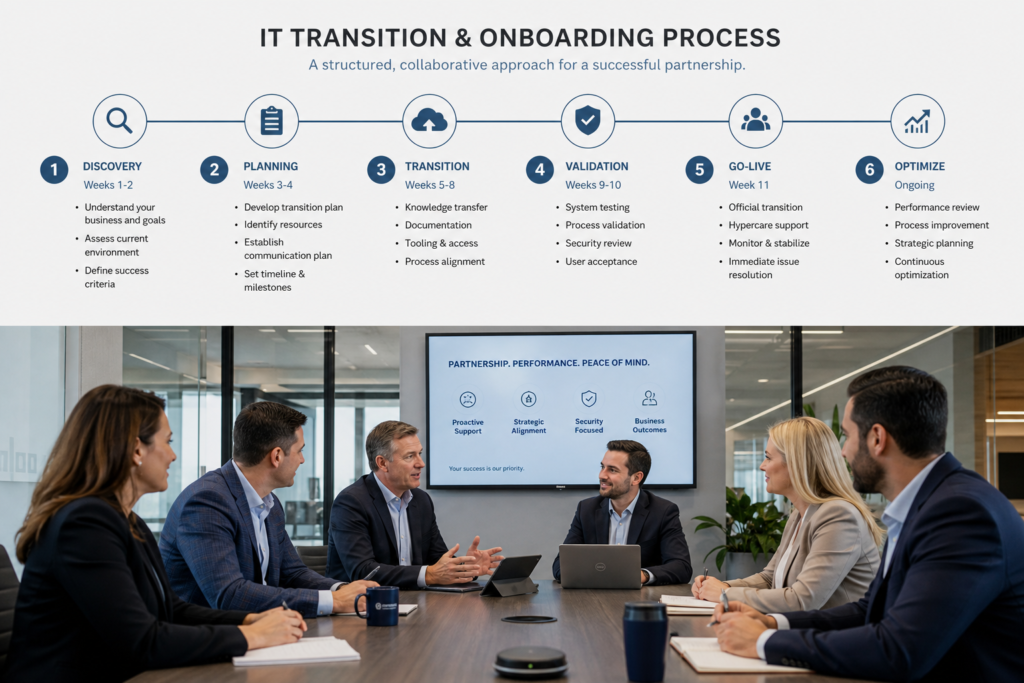
The 60-Day Transition: What a Professional Onboarding Looks Like
Phase 1: Discovery and Documentation (Weeks 1-2)
Before touching a single system, your new provider should document everything about your current environment:
- Network infrastructure audit: Firewalls, switches, access points, ISP configurations, VPN setup
- Server and cloud inventory: Every on-premise server, cloud subscription, and SaaS application
- User and access mapping: Who has access to what, with what permissions
- Backup and DR assessment: Current backup systems, recovery procedures, and test history
- Compliance baseline: Existing SOC 2, HIPAA, WISP, or ABA compliance documentation
- Vendor contact sheet: Every technology vendor, contract, and renewal date
- Known issues inventory: Outstanding problems, recurring issues, and user complaints
This phase is done without changing anything. No risk, no disruption — just building the complete picture.
Phase 2: Parallel Operations (Weeks 3-4)
During this phase, your new provider deploys their monitoring, security, and management tools alongside your existing systems. Both providers are active. This means:
- New monitoring agents are installed on all devices
- New security tools (EDR, email protection, MFA) are deployed
- New backup systems are configured and running parallel to existing backups
- The new helpdesk is activated for staff to test
- Critical credentials and admin access are transferred
Nothing is removed yet. Everything is additive. If any issue arises, the existing infrastructure is still intact as a fallback.
Phase 3: Cutover and Validation (Weeks 5-6)
With parallel systems validated, the cutover begins. This is scheduled during your firm’s lowest-activity period — never during busy season, never on a Monday morning. Each system is cut over individually with a rollback plan:
- DNS and email records updated (scheduled for Friday evening or Saturday)
- Old monitoring and management agents removed
- Old security tools decommissioned (only after new tools are confirmed active)
- Staff communication: new helpdesk contact information, new procedures
- Outgoing provider formally offboarded
Phase 4: Stabilization and Optimization (Weeks 7-8)
The first two weeks after cutover are dedicated to catching anything the transition surfaced:
- Daily check-ins with your office manager or designated contact
- Rapid response to any staff-reported issues
- Performance baselining to establish normal operating metrics
- First-round optimization of identified weak points
- Compliance gap remediation plan delivered
Addressing the Real Concerns
“What about downtime during the switch?”
A professional transition has zero planned downtime. Every cutover step has a rollback procedure. Critical systems (email, security, backup) are never in a gap — old systems stay active until new systems are confirmed operational. If your prospective provider cannot guarantee this, they are not experienced enough for the job.
“My current provider holds our passwords and access.”
This is common and manageable. Your new provider works with each software vendor directly to transfer admin access. Microsoft 365, Google Workspace, cloud applications, and domain registrars all have established processes for ownership transfers. If your current provider refuses to cooperate, your new provider should know how to escalate through vendor channels.
“The cost of switching seems high.”
Most reputable managed IT providers absorb onboarding costs into their monthly pricing rather than charging large upfront transition fees. The real cost question is: what is your current provider’s underperformance costing you in lost productivity, compliance gaps, and opportunity cost? For a 20-person CPA firm, even 2 hours of lost productivity per person per month (from slow systems, recurring issues, poor support) costs more annually than any transition fee.
“What if the new provider is worse?”
This is why the evaluation process matters. Before signing, verify references from firms in your industry, review their SLA and response time commitments, understand their escalation procedures, confirm their compliance expertise with specific questions, and ask about their client retention rate. A provider confident in their service will have transparent answers to all of these.
When You Should Not Switch
Honest advice: do not switch IT providers during your busiest period. For CPA firms, that means no transitions from December through April. For law firms, avoid switching during major trial preparation or year-end. For medical practices, avoid transitions during open enrollment or flu season surges. Start the evaluation 3-4 months before your preferred transition window.
How Transform 42 Handles Transitions
At Transform 42, we have onboarded dozens of professional services firms — accounting firms, law firms, and medical practices. Every transition follows our documented 60-day parallel migration process. We absorb all onboarding costs. We run parallel systems throughout the transition. We schedule every cutover during your lowest-risk window. And we maintain daily check-ins through stabilization.
As a Service-Disabled Veteran-Owned Small Business, we take the transition as seriously as you do — because the trust you extend to a new technology partner is earned during the onboarding, not after.
Start with a free IT assessment — no commitment, no pressure. Just a clear picture of where your technology stands and what a transition would look like for your specific firm.